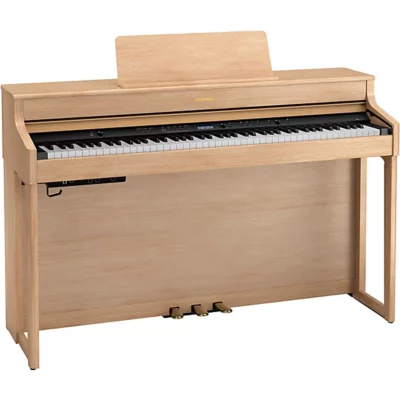


Roland HP704 Digital Piano
Price range: $3,099.99 through $3,699.99
- 88-note PHA-50 keyboard with Escapement and Ivory Feel
- Four-speaker Acoustic Projection System, 60W
- SuperNatural sound engine
- Over 320 built-in instruments
- 5 finish options including Polished Ebony
- Bluetooth MIDI and Audio
- 2 headphone jacks, 1/8″ and 1/4″
- Open or close the fallboard to power the piano on or off
- Includes matching bench and Roland warranty
- Free white glove delivery or shipping *
Free shipping

Roland HP704 Piano Sound
SuperNATURAL Modeling
Roland’s SuperNATURAL Piano Modeling digitally recreates the complex interactions within an acoustic piano, going beyond static samples to produce sound. This technology simulates dynamic harmonic behavior, various resonances, and key-off characteristics in real time, resulting in a highly expressive and realistic piano sound that responds naturally to your playing. Unlike sample-based instruments, it continuously generates sound based on your touch, offering a nuanced and authentic playing experience.
Other Built-in Instruments
Featuring 7 dedicated instrument categories: Piano, Electric Piano, Strings, Organ, Upright Piano, Classical Piano, and Do Re Mi, with a total of 59 sounds. Nine different drum sets (drum machines), and 256 General MIDI 2 instruments featuring a wide range of instruments including piano, electric piano, guitar, bass guitar, orchestra, pad synth sounds, sound effects and more.
On Board Buttons and Functions
Piano Designer Button
Create your own piano sound by pressing the Roland Piano Designer button. This feature allows you to deeply customize various aspects of the piano’s sound, from string resonance and hammer response to cabinet acoustics, tuning, and even 10 different tuning temperaments, offering a personalized playing experience. This can be done on board the piano or via the Roland Piano Designer App.
Registration Button
You can save 36 favorite performance settings right to the piano via the Registration button.
Split and Dual Button
Split Play
The Split Play button enables you to assign different sounds to the left and right sides of the keyboard, with the division occurring at a split point of your choosing. You can also change the volume balance between the two tones and the octave at which each tone is played. This option can be selected on the piano or through the Roland Piano App.
Dual Play
You can play two tones simultaneously from a single key. This function is called Dual Play, or layering. Further customization is achieved by adjusting the individual volume of the two tones and changing the octave at which each tone is played.
Transpose Button
Transpose the keyboard in semitones so you can play in different keys without changing your fingering.

Roland HP704 Keyboard and Pedals
The Roland 88-note PHA-50 keyboard with Escapement and Ivory Feel combines wooden key sides with a durable molded inner frame, giving you the familiar feel of a wooden keyboard without the maintenance an all-wood action demands. It replicates the subtle click of hammer action and the tactile sensation of ivory keys, and the weighted, graded response holds up under advancing technique. This is the same action family Roland fits to its flagship LX series.
The Pedals
The Roland Progressive Damper Action pedal offers continuous and nuanced sustain control, responding like an acoustic piano pedal with lighter resistance initially and heavier resistance as it is pressed further.
From left to right, the Roland HP704 replicates the traditional grand piano setup of soft pedal (left), sostenuto (middle) and damper pedal (right).
You can further customize the pedals to change your piano registration settings, activate a layered sound hands free, or start and stop a selected WAV or MIDI file.
Progressive Damper Action pedal (damper pedal: capable of continuous detection. Soft pedal: capable of continuous detection, function assignable. Sostenuto pedal: function assignable).

Roland HP704 Sound System
The Roland HP704 carries a four-speaker Acoustic Projection System. The speakers are divided into two pairs, each with dedicated amplification, so the cabinet reproduces the full dynamic range of the SuperNATURAL engine rather than compressing it. The result is sound that fills a room the way an acoustic upright does.
Speakers
Cabinet and near-field speakers: 12 + 2.5 cm (5 + 1 inches) x 2 (coaxial speaker)
Spatial speakers: 5 cm (2 inches) x 2
Amplifiers
25 W x 2
5 W x 2
Metronome
The built-in metronome has 13 different time signatures, with 4/4 as the default value.
Available time signatures: 2/2, 3/2, 2/4, 3/4, 4/4, 5/4, 6/4, 7/4, 3/8, 6/8, 8/8, 9/8, 12/8
You can also customize the metronome click, add a bell on the first note of the measure, adjust the volume, or have the piano count off the notes in English or Japanese.
Built-in Recording
The Roland HP704’s recording function lets you record up to 3 tracks using the built-in instruments, the metronome, or alongside an external audio file or song. You can save your performance as either MIDI or WAV audio files, recorded directly to internal memory or to a USB flash drive. The recording feature is valuable for self-evaluation, sharing musical ideas, or practicing with layered instrumental parts.
You can also record externally using the USB B output and connecting to a computer or other MIDI compatible equipment.
Built-in Songs and Lessons
The Roland HP704 includes a collection of built-in songs for enjoyment and study, enhanced by learning tools such as adjustable tempo, key changes and playback of individual performance parts, with score display via the Roland Piano App.
The HP704 also features 30 Do Re Mi lessons, major and minor scales in all keys, Hanon exercises 1-20, Beyer Vorschule im Klavierspiel Op.101 No.1-106, Burgmüller 25 Études faciles et progressives Op.100, and Czerny 100 Übungsstücke Op.139.
You can also play music by plugging in a USB flash drive or using the Bluetooth Audio function.
Roland HP704 Finish Options

Inputs and Outputs
- USB Computer port, USB B cable to plug into a computer
- USB flash drive port, save or play MIDI or WAV files
- 1/8″ TRS AUX input jack, import music or audio from a device
- 1/4″ output jacks, L/mono and R to plug into speakers
- 1/8″ TRS and 1/4″ TRS headphone jacks, 2 headphone jacks
- Bluetooth Audio, stream audio from a device to the piano
- Bluetooth MIDI, transmit MIDI data to and from a device and use with apps
Other Features
- Volume Limit: set the maximum volume in increments of 20, from 20 to 100
- Auto Off: the HP704 turns off after 30 minutes of non-use
- Classic Position: 2-position fallboard covers the buttons, showing only the keys
- Screen Saver: panel lights dim after a set time
- Twin Piano: transform the HP704 into two 44-note keyboards in the same tonal range
- Power Fallboard: turn the piano on or off by opening or closing the fallboard
- Panel Lock: disable the on board buttons
- Import or export your registrations via USB thumb drive to other Roland digital pianos
Roland HP704 Downloads
Roland HP704 and HP702 Owner’s Manual, Onboard Instrument and Song List
Roland Piano App, Apple
Roland Piano App, Google Play Store
Roland Piano Designer App, Apple
Roland Piano Designer App, Google Play Store
Technical Specifications
Complete specifications for the Roland HP704 Digital Piano
| Roland | |
|---|---|
| ROL-HP704 | |
| Bluetooth | Audio Receiving and App Connectivity |
| Built In Speakers | Yes |
| Connectivity | USB and Bluetooth |
| Included From Manufacturer | AC adaptor, Power cord, Headphone hook, Owner's manual |
| The collection of scores "Roland Piano Masterpieces" | |
| Keys Weighted | Hammer Weighted |
| Key Cover | Yes |
| Number of Keys | 88 |
| Piano Cabinet Style | Upright |
| Duet Mode | Yes |
| Finish | Light Oak, charcoal black, dark rosewood, satin white, polished ebony |
| Half-Damper Support | Yes |
| Audio Inputs | |
| 1/8" Aux in | |
| Audio Outputs | |
| 1/4" (L/Mono, R) | |
| 1/8" Headphone Out | |
| 1/4" Headphone Out | |
| Key Action | PHA-50 Keyboard: Wood and Plastic Hybrid Structure, with Escapement and Ebony/Ivory Feel |
| Layer Feature | No |
| Metronome | Yes |
| Pedals | |
| Progressive Damper Action Pedal (Damper pedal | capable of continuous detection, Soft pedal: capable of continuous detection/function assignable, Sostenuto pedal: function assignable) |
| Song Recorder | Audio and MIDI |
| Number of Songs | Approx. 70,000 notes memory |
| Number of Sounds | 324 |
| Speaker Power | 25 W x 2 (5 W x 2) |
| Speaker Size | Near-field Speakers: 5" Spatial Speakers: 2" |
| Split Feature | Yes |
| Storage Type | USB;Internal |
| Number of Tracks | 3 |
| Transpose Feature | Yes |
| Voices of Polyphony | Piano: Limitless (solo playing using ‘Piano’ category tones) |
| Other | 384 |
| Weight | 131 lbs 3 oz |
| Width | 54 1/8" |
| Depth | 18 1/4" |
| Height | 36 7/8" |
| Weight | N/A |
|---|---|
| Dimensions | N/A |
| Roland Finish Options | Charcoal Black, Dark Rosewood, Light Oak, Polished Ebony, Satin White |
Call (609) 403-6045
We will be happy to answer your questions during our business hours.
"*" indicates required fields
You May Also Like
-
Sale!

CLP-835 Yamaha Clavinova Digital Piano
Price range: $3,299.99 through $3,999.99 Read More This product has multiple variants. The options may be chosen on the product page -
Sale!
CLP-845 Yamaha Clavinova Digital Piano
Price range: $4,299.99 through $4,999.99 Read More This product has multiple variants. The options may be chosen on the product page -
Roland LX-5 Digital Piano
Price range: $4,149.99 through $4,649.99 Read More This product has multiple variants. The options may be chosen on the product page -
Roland HP702 Digital Piano
$2,149.99 Read More This product has multiple variants. The options may be chosen on the product page